

Business Partners
Who Sees It
Section titled “Who Sees It”Business partners is offered to a member whose role may manage customers, and only where the organisation’s plan includes sealing.
Unlike Verify and Seals, this page does not need the companion on your device. Administering partners is a different job from sealing.
On a personal account without the sealing feature the page says Business partners require a signing plan and offers View plans.
Where It Is
Section titled “Where It Is”Under People & partners in the menu, beside the team.
What a Partner Is
Section titled “What a Partner Is”A business partner is an outside organisation that you register: a supplier that sends you invoices, a notary, an agency or a subcontractor.
A partner issues one-time codes and seals files, each under its own name. Whoever checks one sees the partner’s name, for example Genuine — Nordwind GmbH. The partner is never shown as your organisation.
One partner can work for several organisations, each with its own contract. Each organisation registers the partner on its own. Recipients see the name given by the organisation that has authorised the partner the longest. If that organisation revokes the partner, the name the next organisation gave applies.
Sealed Invoices
Section titled “Sealed Invoices”Invoice fraud often works like this: an attacker gets into the email exchange with a supplier, takes a real invoice and changes only the bank account. Logo, invoice number and amount are correct.
A partner can seal the invoice file together with the payment instruction on its partner page. The file stays on the partner’s device; only its fingerprint is sealed. The partner sends the verification link together with the invoice.
Before you pay:
- Open the link. Check that the page names the partner you registered.
- Drop the invoice file you received on the page. Your browser compares it with the sealed original; nothing is uploaded.
- If the page reports a different file, or the invoice arrives without a link, do not pay. Ask the partner through a contact you already know.
The seal proves who sealed the file and that nobody changed it since. It does not prove that the amount is owed.
What It Shows
Section titled “What It Shows”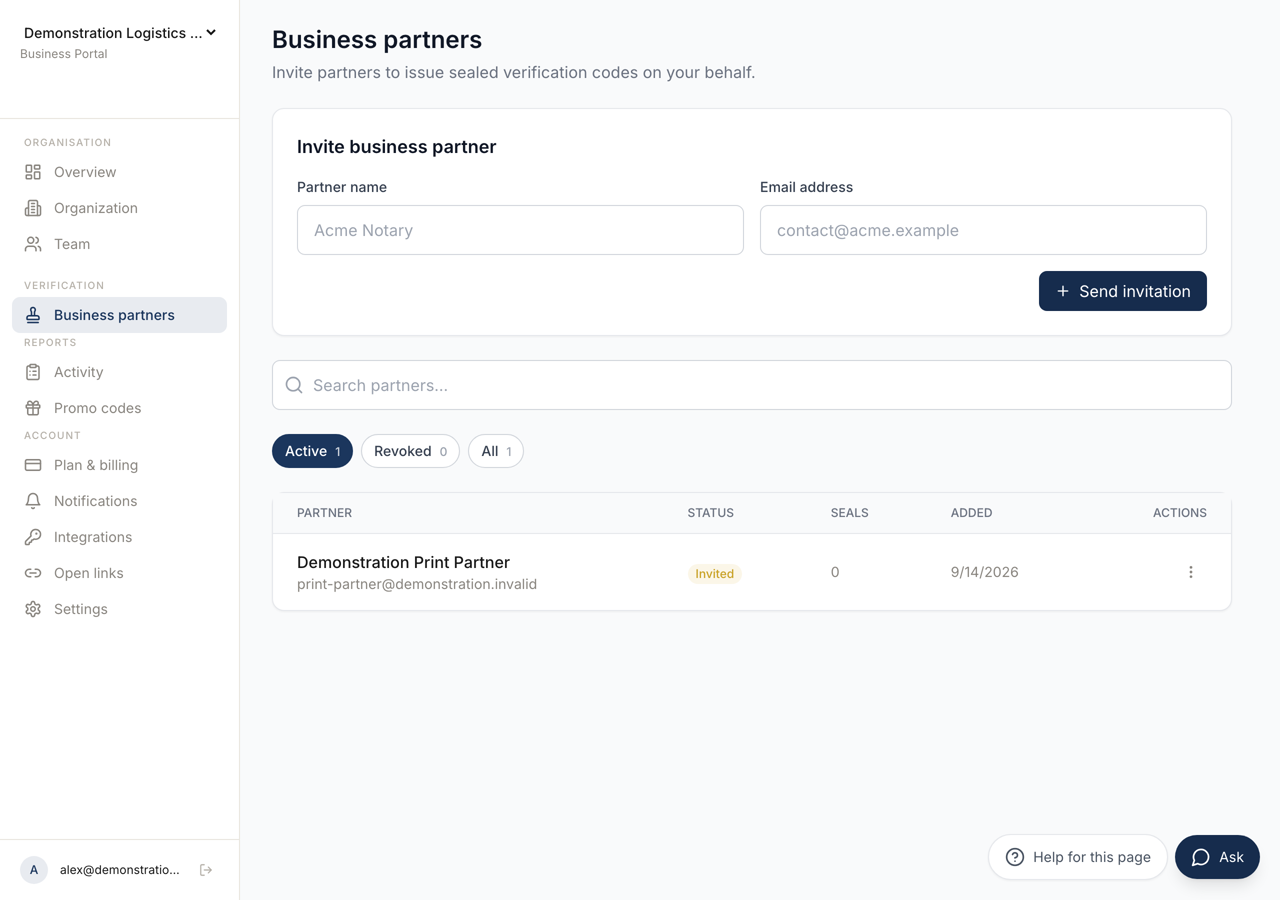 123
123- 1Creates the invitation. What comes back is a link to give the partner.
- 2A partner you revoke stays listed, so the record of the authorisation is kept.
- 3Each partner, whether they have accepted, and how many seals they have issued.
A table with the columns Partner, Status, Seals, Added and Actions, a search box, and the filters Active, Revoked and All.
A status is Invited until the partner accepts, then Active, and Revoked once you withdraw it. Seals counts what they have issued.
With nobody listed it says No business partners yet.
Seals counts the one-time codes and the sealed files the partner issued. Each row also shows Shown to recipients as with the name recipients see.
Inviting a Partner
Section titled “Inviting a Partner”Invite business partner asks for a Partner name and an Email address, and Send invitation creates the invitation.
What comes back is Invitation ready, with the link to give the partner and a QR code for the same link. Copy link takes it. The partner accepts through that link, and the status changes.
Send the link over a channel you trust. Whoever holds it is the person who accepts.
Their Devices
Section titled “Their Devices”Manage devices lists the partner’s active signing devices.
Each device signs on its own. Revoking one stops that device sealing and leaves the others working, which is the right action when a laptop is lost and the partner is otherwise fine.
A device serves every organisation the partner works for. After you remove one, the partner signs in again on that device.
Revoking a Partner
Section titled “Revoking a Partner”Revoke withdraws your organisation’s authorisation. From that moment the partner is no longer your partner.
When no other organisation authorises the partner, its signing keys are revoked too, and it can issue nothing at all. When another organisation still authorises it, the keys stay: that contract is not yours to end.
What the partner ALREADY issued keeps verifying. A reader checks what was true when it was signed, not what is true today. Revoking is therefore a block on future work and not a recall.
The check page does not show whether a partner is still yours. After you revoke a partner, tell the people who pay invoices that seals from this partner no longer count for you.
If the concern is one machine rather than the partner, revoke the device instead.
Renaming
Section titled “Renaming”Edit name changes how the partner is labelled here. It changes nothing on their side and affects no code.