

Notification Preferences
Settings → Manage account opens your account portal in a browser. Choose Notifications there to set the topics. An account on your organisation’s own server has a Notifications row in Settings instead, and it opens this screen.
What You Can Change
Section titled “What You Can Change”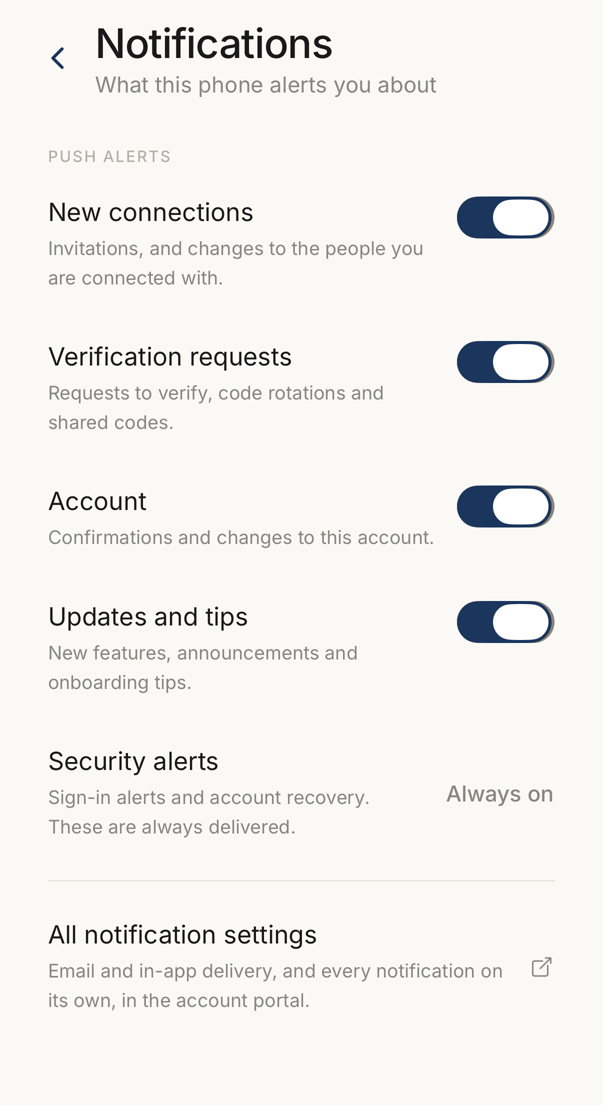 12
12- 1Four kinds of push alert, each with its own switch.
- 2Security alerts have no switch. Sign-in and recovery messages are always delivered.
This screen controls which push notifications this phone alerts you about. There are four of them: New connections, Verification requests, Account, and Updates and tips. Tap a toggle to turn one off.
Email and in-app delivery are not set here.
Always On
Section titled “Always On”Security alerts, which cover sign-ins and account changes, are sent whatever you set on this screen. They appear as Always on and have no toggle.
There is no reset control here. To restore a topic, turn its toggle back on.