

Plan and Billing
Who Sees It
Section titled “Who Sees It”Plan & billing is offered to every member of an organisation. No role hides it.
That is deliberate. An organisation whose plan has lapsed holds no feature any gate could test, and hiding this page would hide the way to pay from the one customer who most needs to find it.
What the page offers, however, does depend on who you are. Only the owner can open the payment portal or change the plan. Everybody else sees the plan and is told Only the owner can manage billing for this organisation.
Where It Is
Section titled “Where It Is”Under Account in the menu.
What It Shows
Section titled “What It Shows”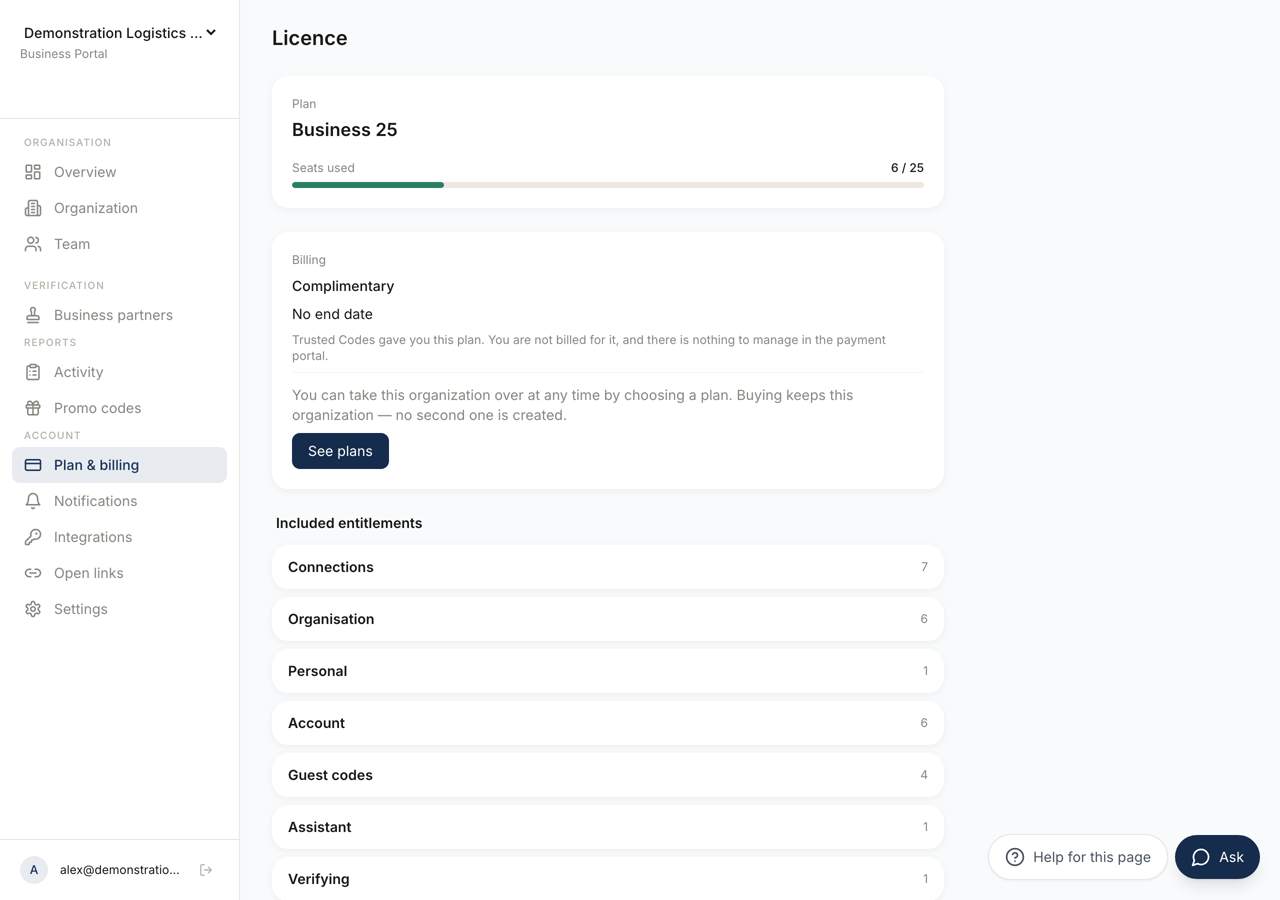 123
123- 1The plan and how many of its seats are in use. The bar turns amber as it fills.
- 2How the plan is paid for. A plan Trusted Codes granted reads **Complimentary** and has no payment portal.
- 3What the plan carries. This list is the ceiling the groups hand portions of out.
The heading is Licence.
The first card names the Plan and shows Seats used as a number over the limit, with a bar that turns amber as it fills and red as it nears the ceiling.
If the plan has lapsed, the card says so, and says what it costs: members have no codeword access.
Billing
Section titled “Billing”The billing card shows the price per month or per year, when the plan renews, and, during a trial, when the trial ends. Manage billing opens the payment portal, where cards and invoices live.
During a trial the same line also counts the days left, for example 3 days left. In the last four days the owner also sees a notice above every page of the business portal: the date the trial ends, the amount charged on that day plus tax where it applies, and a link here. To keep or cancel the plan, use Manage billing on this page.
Where Trusted Codes granted the plan rather than selling it, the card reads Complimentary instead, with the date it ends or a note that there is none. There is no price and no payment portal, because there is no payment. An owner is offered the way to take the organisation over by buying a plan, and buying keeps this organisation rather than creating a second one.
A Cancellation in Progress
Section titled “A Cancellation in Progress”When the plan is set to end, the page lists what ends with it, on the date it happens: every member loses codeword access, the public verification page stops being served, beacons and seals stop working, and no new members can be added.
It also says what does not happen. Nothing is deleted. Members, connections and data stay.
Changing the Plan
Section titled “Changing the Plan”Change plan is offered to the owner, and not while the plan has lapsed. Choose a band, and before anything is charged the page previews the change.
The preview shows how many seats would be used after it, the amount due now, and the date of the next invoice. Where the amount cannot be quoted it says so rather than showing a zero, and the payment provider shows the real figure before it charges.
If the new plan is smaller than your current usage, the preview names how many members would be above the new limit and states the consequence: nobody is removed, and a grace period starts.
Confirm applies it. The change takes a moment to be confirmed, and the page says so while it waits.
An Enterprise agreement is not changed here, and the page does not say so: the controls for changing a plan are simply absent. Your agreement is with us directly, and it is changed the way it was made.
Included Entitlements
Section titled “Included Entitlements”The last section lists what the plan carries, grouped by area, with the limits it sets.
This list is the ceiling. Organisation and Groups hands portions of it out to groups, and nothing given there can exceed what is shown here.
Personal Accounts
Section titled “Personal Accounts”On a personal account the page reads Free and explains that a personal account has no organisation and no licence to manage. See plans leads to where a Business plan is bought, which is what creates the organisation.