

Invite Someone
What This Screen Does
Section titled “What This Screen Does”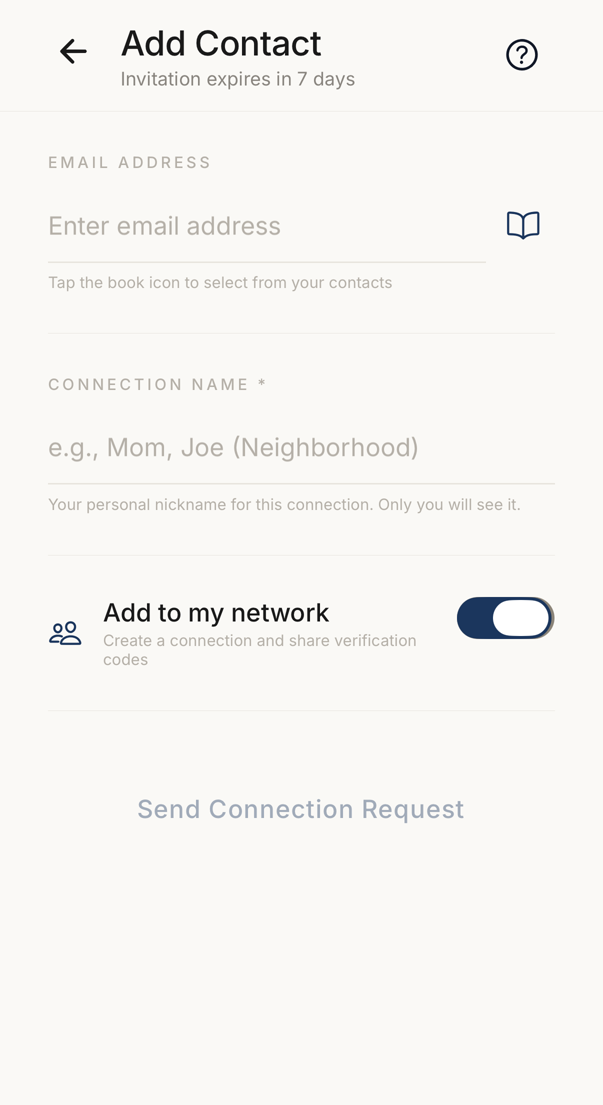 123
123- 1The address the invitation goes to. The book icon opens your contacts.
- 2Your own name for this person. Nobody else sees it.
- 3On, a connection is created and you share codewords. Off, you invite the person and nothing more.
The switch called Add to my network starts on. With it on, a connection is created and you will share verification codes. With it off, you invite the person to Trusted Codes and nothing more happens.
Connection limits apply. When you are at your limit, creating a connection is blocked until you remove one.
Filling It Out
Section titled “Filling It Out”Enter their email address, or tap the book icon to pick somebody from your contacts.
The Connection Name field is your own name for this person. It appears in your list, and they never see it.
Check the email address before you send. A typo means the invitation reaches nobody.
After Sending
Section titled “After Sending”A new connection is created. If the person already has the app, the invitation appears for them straight away. If they are new to Trusted Codes, they receive an email that invites them to sign up.
An invitation you have sent appears in your People tab, under Your Connections, until the other person accepts it. From there you can withdraw it, or re-send it once it has expired.