

New Connection
Where It Is
Section titled “Where It Is”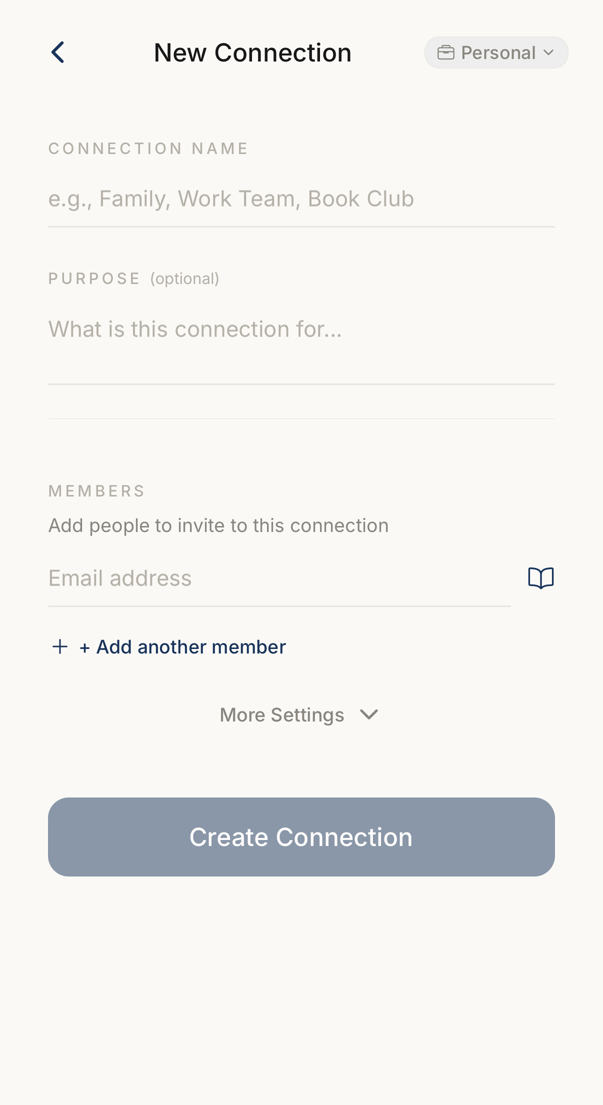 123
123- 1The name of the connection. Every member sees it.
- 2One row per person, each with an email address. Add another member adds a row.
- 3Creates the connection and sends every invitation in one go.
You reach this screen from the People tab, through the control that adds a connection. The home screen and a message can send you here as well.
You have to be online. The screen says so rather than failing quietly.
What You Fill In
Section titled “What You Fill In”CONNECTION NAME is required. PURPOSE is optional. Both are visible to every member.
Under MEMBERS, put in an email address. + Add another member adds a row. The same address twice is refused, and the screen says which row is the duplicate.
More Settings
Section titled “More Settings”More Settings opens the rest: Mark as Favorite, Tags, Code Mode, Code Language, Instant Add, Require Biometric, Code Rotation and Auto-delete after.
You see only what your plan includes, and Code Language and Code Rotation appear only while the code mode is Dedicated or Shared. Turning on Require Biometric asks the device first, and says so if Face ID or a fingerprint is not set up.
Creating It
Section titled “Creating It”Create Connection makes the connection and sends the invitations.
If you are offline the connection is still created, and the invitations go out when you are back. If some invitations fail, the screen says how many.
A demo account cannot create connections.