

Your Profile
Where It Is
Section titled “Where It Is”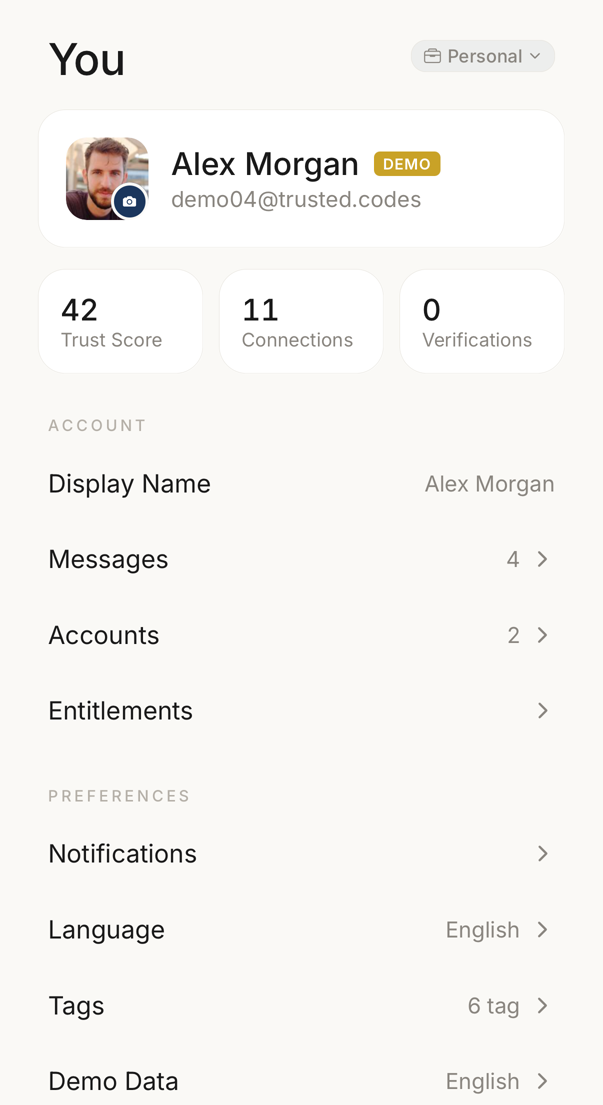 12345
12345- 1Your picture, your display name and the address you signed in with.
- 2Your trust score, how many connections you have, and how many verifications you have made.
- 3The name your connections see. Tap the row to change it.
- 4What your plan allows, and how much of each allowance is spent.
- 5The language the app is in, and the language your codewords come from.
Your profile has no screen of its own. It is the block at the top of Settings, where your avatar, display name and email sit next to your trust score, your connection count and your verification count.
What Other People See
Section titled “What Other People See”Everyone you are connected with sees your display name, so use something they will recognise. A profile picture is optional; without one the app shows your initials.
Your email address appears on no public page. Inside a connection, the owner of that connection can see the email addresses of its members, and the other members cannot.
Changing It
Section titled “Changing It”To change your name, tap the display name row, type the new name and save. Your connections see it immediately.
To change your photo, tap the avatar. From there you can take a photo, choose one from your library, or remove the picture you have.
Tapping the avatar block opens your personal page, which is the page other people reach when they want to request a connection with you.