

Activity
Who Sees It
Section titled “Who Sees It”Activity appears in the menu for a member whose role may see reports.
The page itself opens for a role that may also manage people. If your role sees reports but not people, the entry is in your menu and the page answers You don’t have permission to view activity. That mismatch is worth knowing before you conclude something is broken.
Where It Is
Section titled “Where It Is”Under Reports in the menu.
What the Log Records
Section titled “What the Log Records”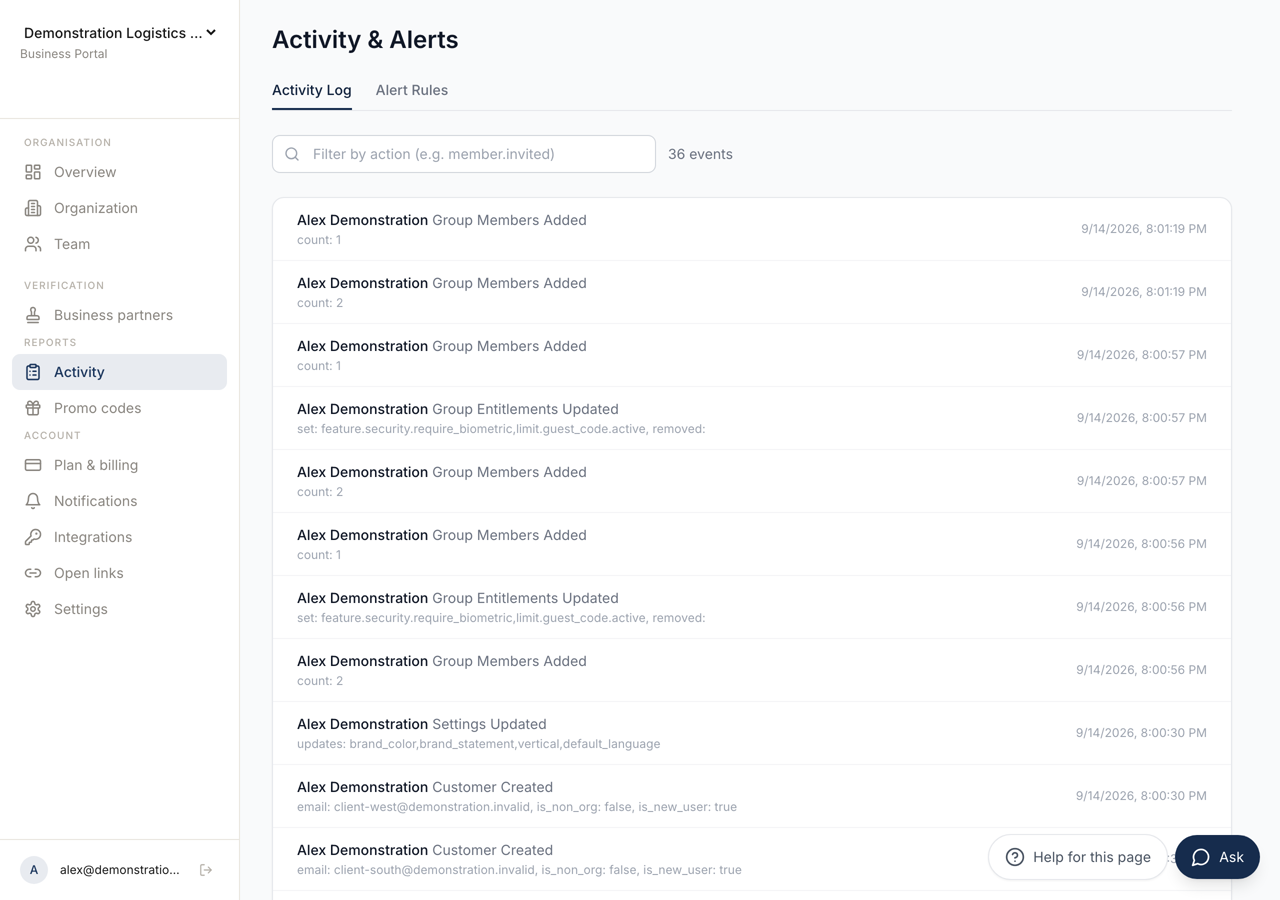 123
123- 1The record of what was done, and the rules that warn you about usage.
- 2Matches on the action. Actions are named subject first, as `member.invited`.
- 3One event: who did it, what was done and when. An action the system took is attributed to **System**.
The first tab, Activity Log, is the record of administrative events in the organisation.
Each line names who did it, what was done and when. Where the event carried extra detail, that detail is printed underneath as a list of values.
An action taken by the system rather than a person is attributed to System.
The heading above the list counts the events currently matched, and the list is paged with Previous and Next and a Page indicator. With nothing recorded it says No activity recorded yet.
Filtering It
Section titled “Filtering It”The filter box matches on the action, and the placeholder shows the shape:
member.invited.
Actions are named in that dotted form, subject first. Typing the first part narrows the list to one area of the console, which is faster than reading forward through pages.
What It Is For
Section titled “What It Is For”Two questions, mostly. Who removed that member, and when did this change happen.
The log answers both without anybody having to remember. Where a setting has moved and nobody admits to moving it, this is the page that settles it.
Alert Rules
Section titled “Alert Rules”The second tab, Alert Rules, is about the future rather than the past. Its purpose is stated on it: get notified when usage approaches limits.
New Alert opens Create Alert Rule, which asks for a Metric and a Threshold (%). The metrics are Seats, Customers, API Calls and Guest Codes.
Each rule shows which roles it would notify, when it last fired, and whether it is Active or Paused.
With nothing configured the tab says No alert rules configured.
Nothing Sends Them Yet
Section titled “Nothing Sends Them Yet”A rule can be created, listed, paused and deleted, and nothing evaluates it. No scheduled task reads these rules, and the “last fired” column stays empty for every rule ever made.
So the tab records an intention rather than a warning you will receive. Until that changes, running out of seats is still discovered the way it always was: somebody invites a colleague and the invitation is refused. The number to watch is on Overview, and the plan is changed under Plan and Billing.
Rules can be paused rather than deleted, which is the better choice while you are deliberately running close to a limit.