

Connection Members
Where the Members Are
Section titled “Where the Members Are”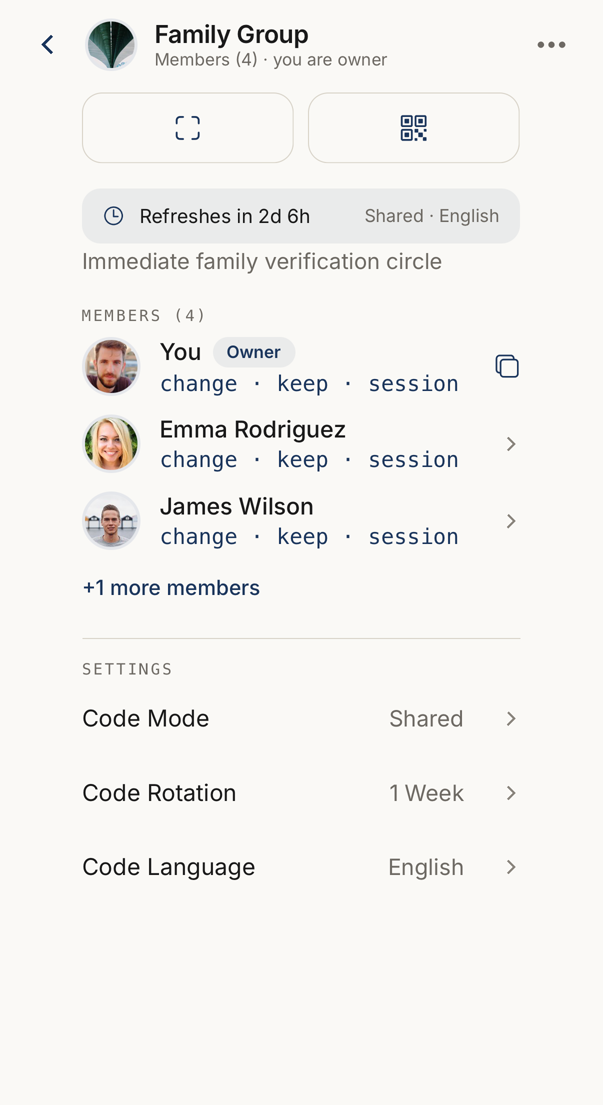 12
12- 1The member list sits below the action row. Each row carries that member's own three words.
- 2The count beside the name is how many people are in the connection.
There is no separate members screen. The member list is the main part of the connection itself. Open a connection from the People tab and the members are below the action row.
Each row shows the member’s avatar, name and that member’s own codewords. Owners are marked, and so is anyone who has not accepted yet.
Adding Members
Section titled “Adding Members”Members are named when the connection is created. On the create screen, add an email address for each person and use + Add another member for the next one. An existing connection’s member list cannot be added to from the app, so create a new connection instead.
The invitation goes out at once. If the person already uses Trusted Codes it appears in their app; if not, they receive an email.
States run pending, then setting up, then active. Every member counts against your allowance.
Removing Members, Leaving, Deleting
Section titled “Removing Members, Leaving, Deleting”The owner removes a member from that member’s sheet. Access ends immediately, and the person cannot return without a new invitation.
An owner cannot remove themselves. To leave a connection you own, delete it, which removes it for everyone.
A member leaves through Leave in the ⋯ menu.
What Each Side Sees
Section titled “What Each Side Sees”The owner sees every member and every pending invitation.
A member sees the other members of the connection, and can rename the connection for themselves without changing what anyone else sees.