

Your Recovery Code
What It Is
Section titled “What It Is”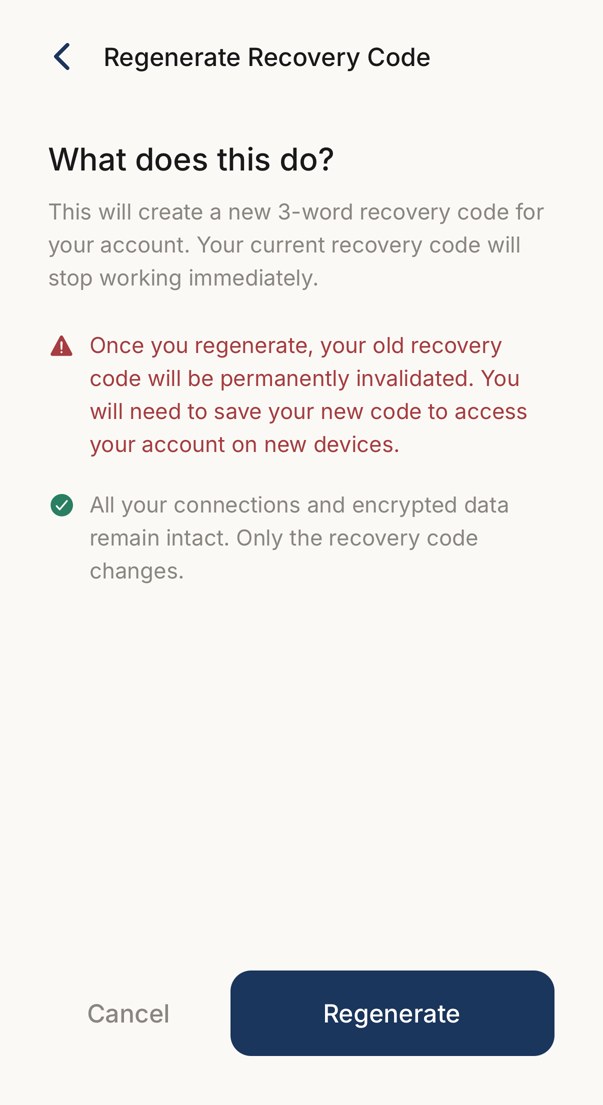 12
12- 1What a new code costs: the old three words stop working the moment you make new ones.
- 2Creates the new words. Your connections and your encrypted data are untouched.
Three words that unlock your data on a new device. The app generates them when you create your account.
Your data is encrypted so that only you can read it, and this code is the key. If you are signed out everywhere and no longer have the words, nobody can bring the data back: not you, and not us. That is the point of it.
Write the words down. Do not keep them in a screenshot or an email.
Where It Is
Section titled “Where It Is”Settings → Security & recovery → Recovery code.
The same screen regenerates it.
Setting It Up
Section titled “Setting It Up”During sign-up the three words appear. Preparing your keys takes about 15 to 20 seconds.
- Write the three words down exactly
- Put them somewhere safe
- Confirm that you have done so
- Continue
A password manager holds them well, and so does paper in a safe place. A screenshot, an email or an unprotected note does not.
Using It on a New Device
Section titled “Using It on a New Device”Sign in as usual, then enter the recovery code when asked.
One word per field. Capitals do not matter. Your data unlocks on that device.
The recovery code on its own does not bring over codewords that already existed on another device. The other device re-shares them once both are online.
Regenerating and Losing It
Section titled “Regenerating and Losing It”Regenerating starts as soon as you confirm it, and the old words stop working at that moment. Your connections and data are untouched; only the key changes.
Regenerate if you think someone saw the words, if you stored them somewhere unsafe, or as routine hygiene.
If you have lost the words and are still signed in somewhere, regenerate now. Nothing is lost.
If you have lost them and are signed out everywhere, the data cannot be recovered. We hold no copy, and if we did the encryption would be worth nothing.
When the App Says “Repair Needed”
Section titled “When the App Says “Repair Needed””Rarely, a phone can no longer read the codewords of your connections. The app says so when you open it and names the button that fixes it, under Settings → About → Diagnostics → Codes on this phone.
- Repair using this phone — offered when this phone still has what it needs. Your own codeword stays the same.
- Repair and start fresh — the last resort. The app asks for your three recovery words, then makes a new codeword for you.
Either way your connections stay. Their codewords are deleted from this phone, and each connection is asked to send its codeword again; it appears as soon as that person opens their app. Nothing else changes.