Codes
Three Kinds of Code
Section titled “Three Kinds of Code”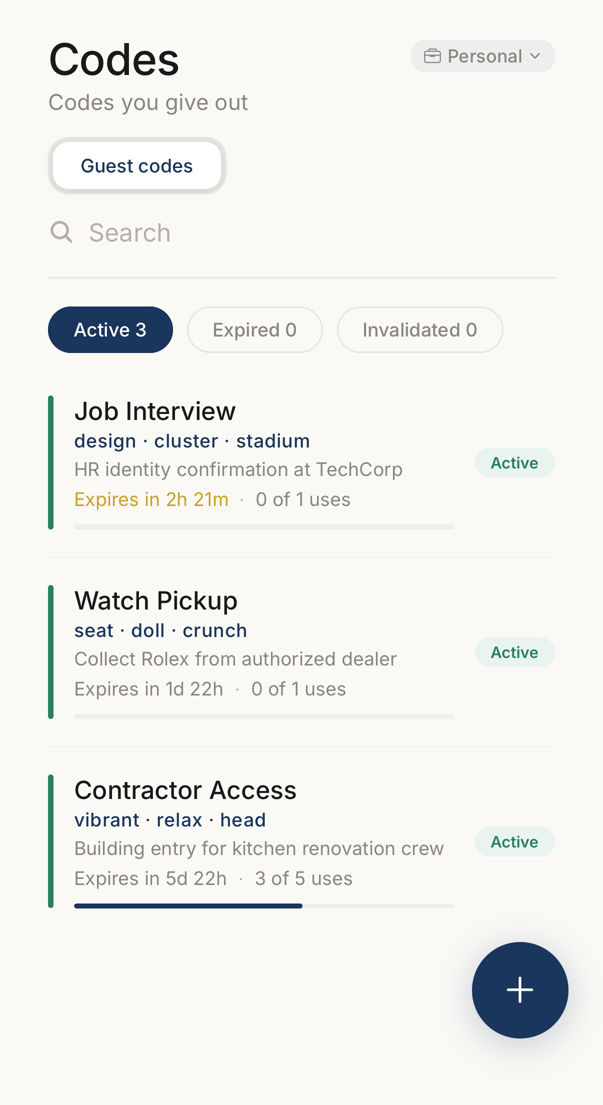 123456
- 1The context the codes belong to. Each business context keeps its own.
- 2Which kind of code the list shows.
- 3Searches your codes by name.
- 4Active, expired and invalidated codes are counted separately.
- 5One code: its three words, what it is for, when it expires, how often it was used.
- 6The plus button makes another guest code.
The Codes tab holds what you give out to other people, in three kinds. A segmented control at the top switches between them.
Guest codes verify a person who does not use the app. Seals prove that something came from you, either as a one-time seal for yourself or as a content seal that binds words to a file. Beacons are the published words of other people that you follow, so you can check them later.
Which segments appear depends on your account. A segment you cannot use is not shown at all. In an organisation, your administrator decides.
Guest Codes
Section titled “Guest Codes”Tap + to create one.
Give it a name, for example “Delivery Tuesday”. A purpose is optional and is shown to the recipient. Further settings, such as the language, how long the code lasts and how many times it may be used, are available depending on your account.
Each row in the list shows the name, the codewords themselves, the status (active with time remaining, limit reached, expired or invalidated) and the purpose. Where the code has a use limit, the row also shows how often it has been used. Swipe a row left to invalidate it at once.
Open a code for its full details and to copy it, share it as a QR image, send it by email, record a verification by hand, or invalidate it.
Where your plan includes guest-code templates, ⋯ at the top of a code’s page offers Save settings as template. The language, the duration, the delivery, the number of uses and whether your email is shown become a template you can pick for the next code. The recipient is never part of it. Right after you create a code, a sheet makes the same offer once, unless a template already has exactly these settings.
A seal is three words derived on your device that prove a thing came from you.
Without a file, the seal is a one-time mark that expires, and it confirms a single message or request.
With a file, it is a content seal: your phone hashes the file, the hash is bound to the words, and the file itself is never uploaded. Anyone who has the file can check that it is the one you sealed.
Rows show the words, an optional description, and an expiry gauge. Seals are part of some plans, and the two kinds are separate. An account may include one and not the other.
Beacons
Section titled “Beacons”A beacon is a word someone publishes so that anyone can check it. It helps when an organisation must be reachable to people who have no connection to it.
This segment lists the beacons you follow, and lets you check a new one.
Your own beacon is not here. It lives behind the beacon glyph in the screen header, together with its settings and its on/off switch. Publishing your own beacon and following other people’s are separate capabilities, and either may be part of your plan without the other.
In a business organisation, your own beacon can be switched on only after the organisation has verified its domain. Until then, the app says so. Seals made for the organisation follow the same rule.
When to Use a Connection Instead
Section titled “When to Use a Connection Instead”Guest codes, seals and beacons are for people you cannot connect with, or need not connect with.
When both sides use the app and verify each other more than once, create a connection. Its words rotate on their own, and neither of you sends anything to the other. A connection is the only one of the four where nothing has to travel between you.